How to Choose a Team Communication Tool in 2026: 7 Practical Criteria
Slack, Microsoft Teams, WhatsApp, or Fareeqy? A practical guide to the 7 criteria that actually decide whether your team will use the tool, or quietly drift back to WhatsApp.
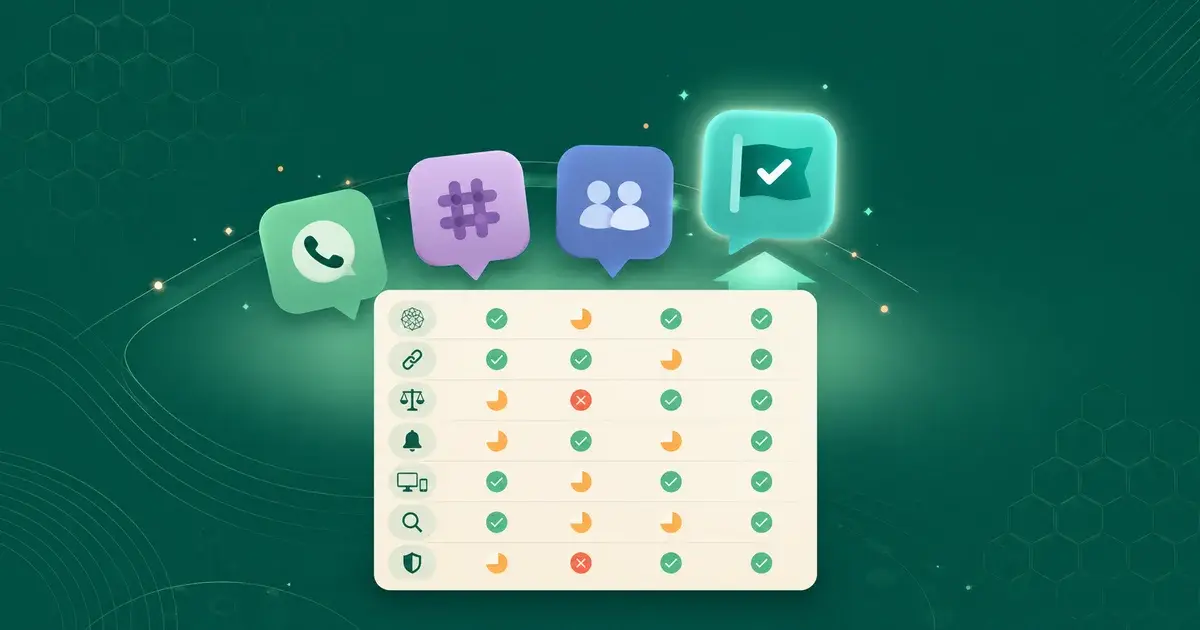
How do you choose a team communication tool?
When you start looking for a communication tool for your team, the options are endless.
Slack is famous in dev teams. Microsoft Teams is the default for anyone on Office 365. WhatsApp is what every small team starts with. Telegram, Discord, Google Chat.. dozens of tools competing on the same idea: one place for all your team's conversations.
The question isn't "which is best?", because "best" depends on your team, its language, and how it works. The real question is: what criteria actually make a communication tool right for your Arabic team?
This guide doesn't give you a "top 10 tools" list. It gives you seven practical criteria to test any tool you're considering, including Fareeqy. By the end, you'll know what you're actually looking for, and you'll understand why Arabic teams choose Fareeqy as their alternative to Western tools.
Why most teams pick the wrong tool
Before the criteria, let's understand why the choice is hard.
Western tools are built for English-speaking teams in Western work cultures. WhatsApp was designed for family and friends, not work. Arabic teams use these tools because they're available.. not because they fit.
The result: a small team in Riyadh runs Slack + WhatsApp + Google Docs + email + Asana. Five tools for five types of communication. The half who don't read English fluently use only half of them.. and the rest drift back to WhatsApp.
Choosing the right tool isn't a technical decision. It's a decision that shapes how your team works every day, and whether they'll actually use the tool, or you'll pay a monthly subscription for something nobody opens.
Criterion 1: Was the tool built for Arabic teams from day one?
The simplest criterion.. and the most ignored.
Slack supports Arabic in its interface, but the support is shallow. Menus are mechanically translated, right-to-left feels mirrored rather than native, and some buttons stay in English because nobody translated them. Microsoft Teams is slightly better, but it's still an English tool with a translation layer on top.
The practical impact? A team member who isn't fluent in English won't use the tool with the same efficiency. They'll avoid features whose names they don't fully understand, and they'll go back to WhatsApp when they need to get something done quickly.
Fareeqy was built in Arabic from the start, not as a translation of an English tool. Every button, every menu, every notification is written in the Arabic that office workers actually use day to day.
Quick test: Open the tool in Arabic mode. Are the buttons in natural positions? Are the words understandable without thinking? If your team needs "training" on the interface, the tool wasn't built for them.
Criterion 2: Does it bring communication and work into one place?
This criterion separates a chat tool from a getting-things-done tool.
Slack and Teams position themselves as "your team's chat room." But the real work happens in other tools, Trello, Asana, Notion, Google Drive. A discussion about a task happens in Slack, but the task itself is in Asana. The attached file gets lost between the two.
The cost? Your team spends 20% of its time switching tools to assemble context.
Fareeqy starts from a different assumption: communication and work aren't separate. A comment on a task happens on the task itself. The project's chat lives inside the project. The file opens from the same screen where you manage tasks.
Quick test: When someone writes a message in the tool, can a teammate open the related task with one click? Or do they have to switch to another app to find it?
Criterion 3: Does it balance fast talk with archived talk?
Team conversation comes in two types: fast and archived.
Fast talk needs an answer within the hour, then it's done. A passing question, a confirmation, a small coordination. WhatsApp does this beautifully.
Archived talk needs a place that preserves it and lets you come back. A formal decision, an announcement, an idea the team needs to think through. Email does this, clumsily.
Most tools pick one side. WhatsApp is fast but has no archive. Email is archived but slow. Slack is a good attempt but leans toward speed, so the important decision drowns in messages within two days.
Fareeqy splits communication into three channels: Conversations for fast talk, Majlis for decisions and announcements that should stay as references, Comments for discussions tied to a specific task. Each channel is designed for its nature.
Quick test: Where's the decision your team made last month.. can you find it in 30 seconds? Or do you have to search across three different chat threads?
Criterion 4: Do the notifications respect your team's time?
Slack is famous for its ability to drown a team in notifications. Every channel, every mention, every update.. you end up either muting everything or leaving the tool entirely.
A good communication tool understands when to interrupt and when to stay quiet.
A small detail that matters: in Fareeqy, when you @mention a teammate, they get an instant notification. But if they're actively reading the conversation in that moment, they don't get a duplicate notification. Because the point of a notification is to draw attention.. not to disturb someone who's already paying attention.
This kind of design disappears when you design your tool for the global Western market. It appears when you design for a real team you understand.
Quick test: Ask your team: how many notifications from the tool did you actually read today? If half of them say "I ignore them all".. the tool isn't serving you.
Criterion 5: Does it work across devices without an app store?
Half your team is on Mac. The other half on Windows. Some manage from their phone. One person is on an iPad while traveling.
Microsoft Teams requires a heavy app on every device. Slack is similar. Memory disappears, the CPU heats up, and updates come every two weeks.
Fareeqy runs from the browser directly. A progressive web app (PWA) you can install on your home screen if you want, but it stays a browser, light, with no app store needed. If you are wondering why we chose that route, and what it costs as well as what it gains, why Fareeqy isn't on Google Play or the App Store lays it out.
Quick test: Can you open the tool on a teammate's phone (they don't have it installed) in 10 seconds, or do you need to download the app and sign in?
Criterion 6: Does the search understand Arabic?
Arabic is a complex language. A single word has multiple forms (الكتاب, كتابي, الكتب, كتبه). A search engine built for English doesn't understand these forms.
In Slack, search for "الاجتماع" and you won't find a message containing "اجتماعنا" or "اجتماعكم". Because the search algorithm is designed for "meeting", not for Arabic with all its morphology.
Fareeqy built its search on understanding the Arabic language. It understands roots, understands different forms, and ranks results by relevance, not just date. Open any conversation, type one word, and the message you need rises to the top.
Quick test: Type an Arabic word in search, then try a different form of it. Do you find the same messages?
Criterion 7: Are security and privacy built in?
The discussion happening in your team's communication tool isn't trivial. It contains client data, prices, contracts, sensitive files. A breach here = legal and financial disaster.
Microsoft Teams and Slack offer good enterprise-level security. But the question you should be asking: are the data of different companies isolated? Are files scanned for viruses before they reach your colleague?
In Fareeqy, every conversation is scoped strictly inside your company, no mixing across organizations. And every uploaded file is automatically virus-scanned before delivery. Details that don't appear in the interface, but they're the difference between a tool you trust with your company's data.. and one you don't.
Quick test: Read the privacy policy. Does it mention virus scanning of files? Does it mention data isolation between companies?
Quick comparison of common tools
Here's a practical look at how the seven criteria apply to the tools most commonly used in the region:
| Criterion | Slack | MS Teams | Fareeqy | |
|---|---|---|---|---|
| Arabic-first design | ❌ | ❌ | ❌ | ✅ |
| Communication + work in one place | ❌ | partial | partial | ✅ |
| Fast/archived balance | ❌ | partial | partial | ✅ |
| Notifications that respect time | ❌ | ❌ | partial | ✅ |
| Cross-device without app store | ✅ | ❌ | ❌ | ✅ |
| Arabic-aware search | ❌ | ❌ | ❌ | ✅ |
| File scanning & data isolation | partial | ✅ | ✅ | ✅ |
This isn't an attempt to say "Fareeqy is better than everyone." Slack is a very respectable tool for English-speaking dev teams. Microsoft Teams is excellent if your company is fully on Office 365. But for Arabic teams who want communication and work in one place.. the pattern in the table is clear.
How to apply these criteria to your team
Start with these questions, honestly:
- What percentage of your team is fluent in technical English? (Decides how much Criterion 1 matters)
- How many tools does your team use daily for communication + work combined? (Decides Criterion 2)
- When was the last time you said "where's the decision we made?" (Decides Criterion 3)
- How many notifications a day do you get from your current tool? (Decides Criterion 4)
- Do you have users on multiple platforms? (Decides Criterion 5)
- Do you often search through old messages? (Decides Criterion 6)
- How sensitive is the data in your conversations? (Decides Criterion 7)
If your answers to half of these questions are "yes, we need this".. you don't need Slack or Teams. You need a tool built for an Arabic team working at full capacity.
FAQ
What's the difference between Slack and Microsoft Teams?
Slack is a specialized chat tool, light, designed primarily for dev teams. Microsoft Teams is part of the Office 365 suite, heavier but combines chat with meetings and files. Both are built for Western markets and don't offer a native Arabic experience.
Is WhatsApp enough for work team communication?
It's enough for the quick question and passing coordination. Not enough for documented decisions, project management, or task tracking. Small teams (3-5 people) might manage with it for a while. Once a team hits 8+ people, problems show up: lost decisions, scattered files, personal chat mixing with work.
What's the best Arabic alternative to Slack?
Fareeqy is the closest Arabic alternative to Slack's philosophy, with fundamental differences: communication is built into project management, search understands Arabic, the interface is designed in Arabic rather than translated, and notifications don't drown the team.
How many tools does a team need for work communication?
One tool, if you pick the right one. Teams using 3-5 tools do so because each one serves a slice and not the rest. A tool designed to combine communication and work cuts this down.
When does your company need a specialized communication tool?
When your team reaches 8+ people, or when you start managing multiple clients/projects simultaneously, or when you start noticing signs like "where's the decision?", "I didn't see the message", "where's the file?" These are symptoms of needing a specialized tool.
Does Fareeqy support real-time communication?
Yes. All chats, comments, and notifications appear in real time for everyone.. without needing a page refresh. Real-time updates have been part of Fareeqy's design from day one.
The bottom line
Choosing a communication tool isn't a technical decision. It's a decision that shapes how your team works every day.
Seven criteria. The more honestly you apply them to the tools in front of you, the closer you get to a tool your team will actually use.. not one you just pay for.
If you're looking for a tool built in Arabic, that brings communication and work together, and that understands the real needs of Arabic teams, try Fareeqy with your team. The free plan is enough to test all seven criteria yourself.
Also read: