Project Management.. A Workspace for Every Project
Every project is a complete workspace for your team: tasks, files, conversations, decisions, and an automatic timeline of every action grouped by day. Color-coded departments group the company's projects by type of work.
The design files are in Drive. The decision about scope sits in an email half the team didn't read. Deadlines live in the project lead's head. And when a new member joins.. they need a week just to figure out what's actually happening.
Every project you run gets scattered across five tools. The time you spend assembling the picture is more than the time you spend running the project itself.
In Fareeqy, a project isn't a card on a board. It's a complete workspace for your team.
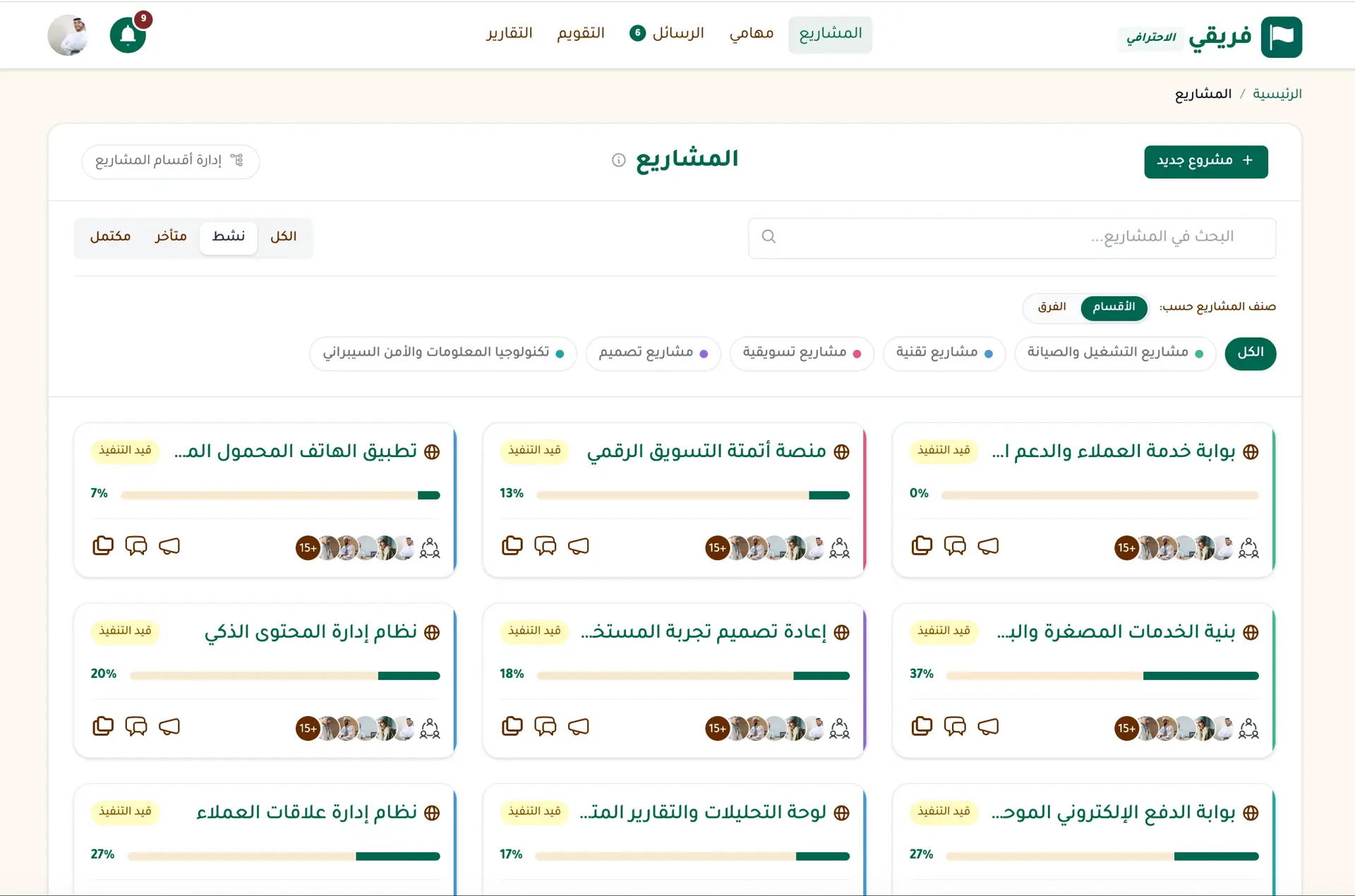
Create a project.. and you'll find it ready from the very first moment: its members list, task lists, file library, team chat, decisions board (Majlis), calendar, and reports. Everything that belongs to the project lives inside it and is scoped to its members. A new joiner sees the full context from day one.
Project management in Fareeqy isn't a feature alongside the others, it's the spine the rest of the platform hangs on. Everything that happens in Fareeqy happens inside a project, for a project.
And because running one project is one thing, running twenty is something else entirely, Fareeqy gives you three organizational layers, used together or separately depending on your company's size:
- Projects dashboard: Every project on one screen with progress, members, and deadlines. You see at a glance what's on track and what needs you right now.
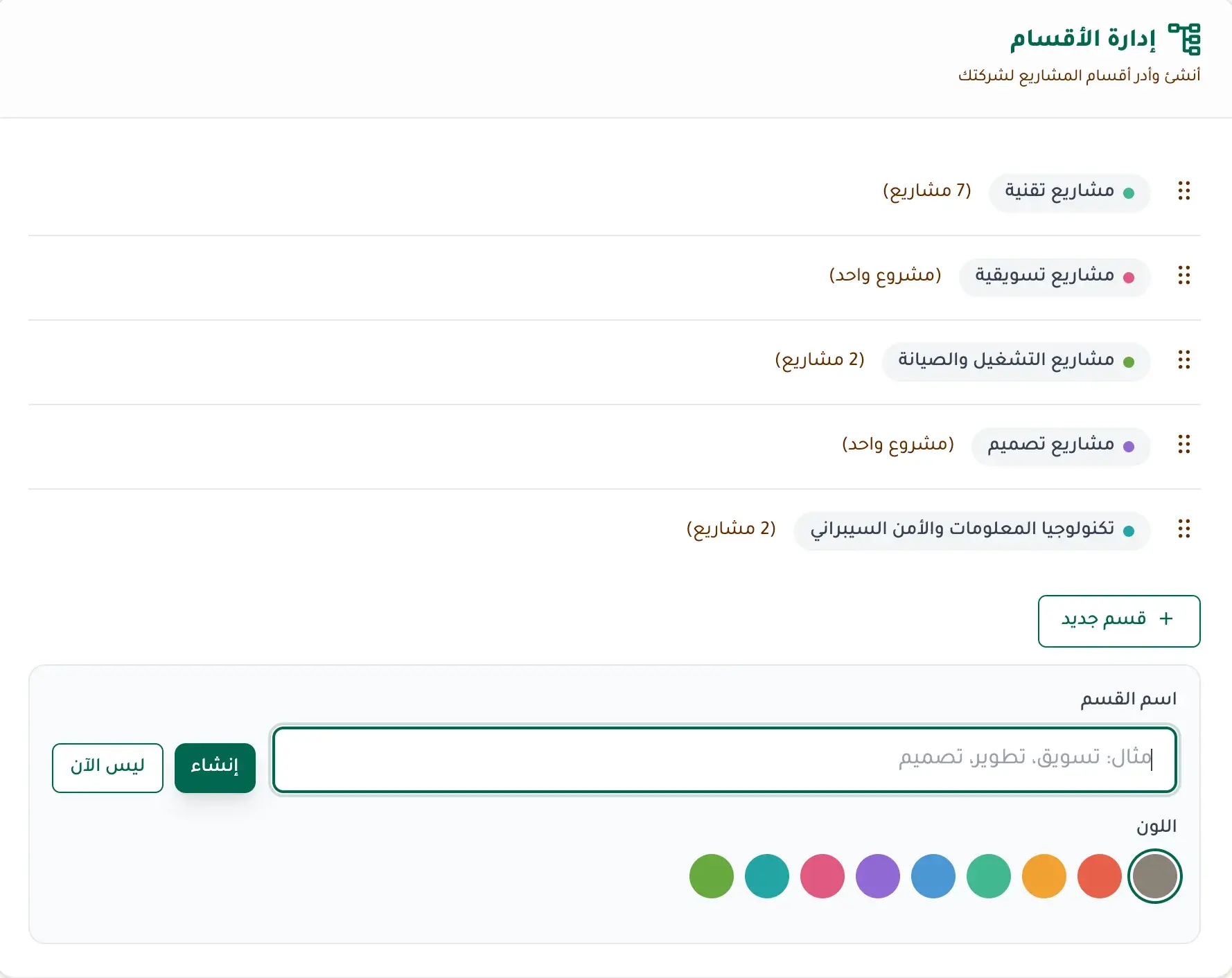
- Project categories: Group your company's projects by type of work (Development, Marketing, Operations), color each category, and get an independent report per type. The executive asking 'where is our effort going?' finds the answer in the category report, not in guesswork.
- Task lists inside a project: A product launch project has a design team, an engineering team, a content team. Piled in one list, every member drowns in tasks that aren't theirs. Spread across task lists, one per team, every member finds what's theirs, while the manager keeps the full view.
At the project level itself: set start and end dates, and make a project public to your whole team or private to selected members and entire teams. Progress is calculated automatically from completed tasks, no manual updates, no 'where are we?' in every meeting. Filter the list by status or category, and sort by recency or completion rate.
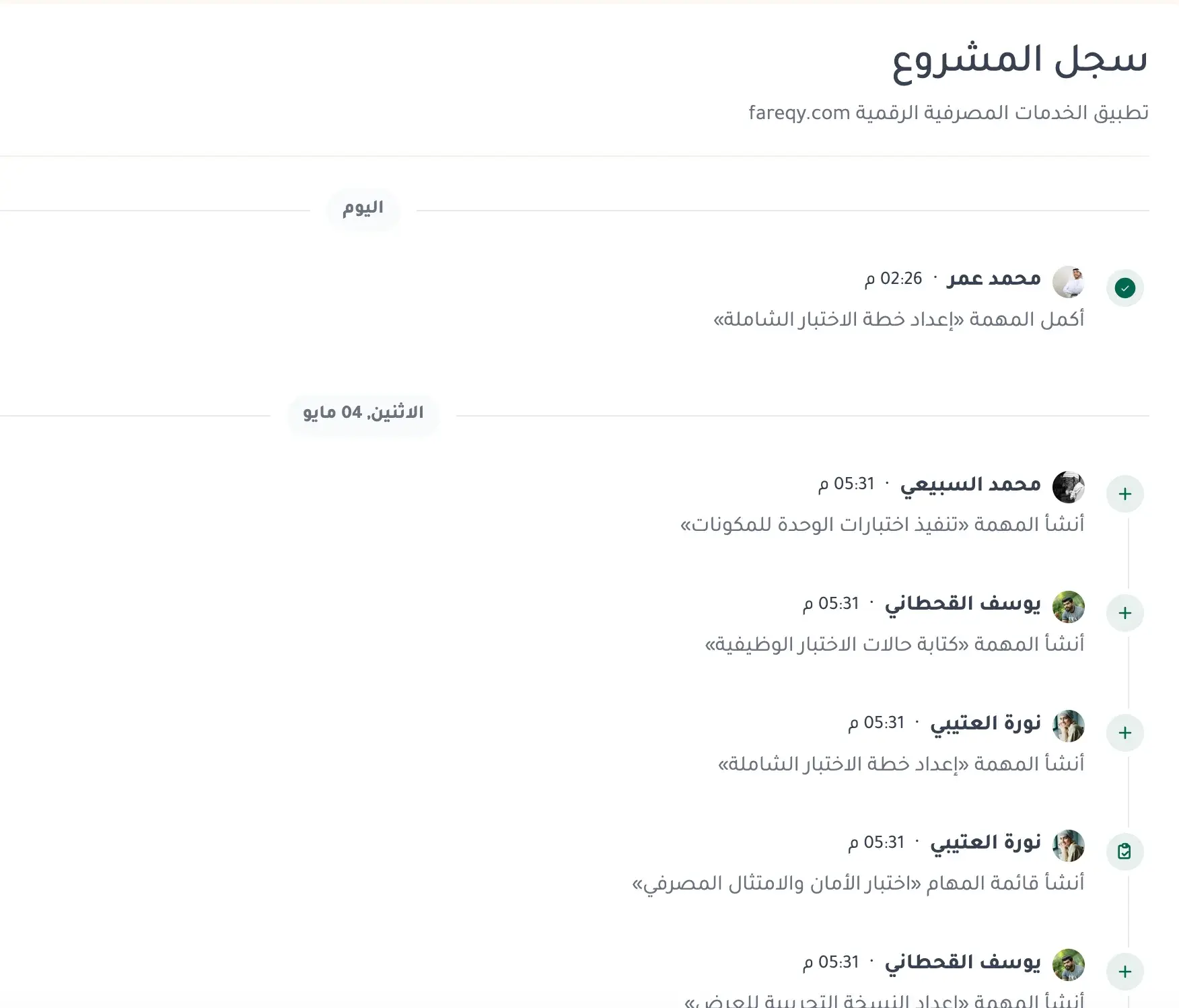
The Project Timeline writes itself: every task created or completed, every file uploaded, every member added, every announcement posted, recorded instantly on a single page, grouped by day. Read-only. A returning manager catches up in five minutes; an owner sees where work is going without a meeting. The Project Timeline is available on the Advanced and Productive plans.
And when a project finishes, a launch that shipped, a client that paused, an internal initiative that wrapped up, you don't need to delete it or let it clutter your list. Archive the project in one click from its options menu. Your main list cleans itself; the project moves to the Archive tab with all its data intact, tasks, files, comments, discussions, and chat history, all readable and searchable. Nobody can add new content to an archived project, and reports exclude it by default with an opt-in "Include archived projects" toggle for historical reviews. When your team decides to come back to it? Click "Restore project", and it's back in the active list immediately, exactly as you left it. Archive, don't delete.
Every project is isolated by its own permissions. Private projects stay invisible to non-members, and every uploaded file up to 500MB is virus-scanned before it reaches your colleague. No leakage between teams, no mixing between clients.
The result? A small project you run as if it were your personal space, and twenty projects across your teams you run with the same clarity. Every project organizes itself.. and you focus on moving it forward.
What's Inside Every Project?
Each of these features lives inside the project, tied to it and scoped to its members. Create a project, and the whole system activates around it.
Task Management
Turn projects into clear tasks. Prioritize, assign, and track completion in real time.. with an automatic activity log on every task showing who created, edited, and completed it.
Learn more →Conversations
Direct messages, group chats, and a chat for every project that's auto-created with the project. With Arabic-aware search, voice messages, and smart @mentions, all inside Fareeqy.
Learn more →Majlis
A discussion and documentation board inside every project. Document your team's decisions, post announcements and ideas, and build a permanent reference for your project away from message clutter.
Learn more →File Sharing
Upload files and documents in a secure virus-protected space, and share them with your team in one click.
Learn more →Calendar
Hijri and Gregorian calendar combining your meetings and task deadlines in one view so you never miss a date.
Learn more →Reports & Tracking
Detailed reports on team performance and project progress. Know where your team's time goes and make data-driven decisions.
Learn more →How Fareeqy Runs Your Projects
A Full Workspace from Day One
Create a project and find its chat, members list, file library, and decisions board ready instantly, no setup steps, no manual wiring.
Progress Calculated Automatically
Completion percentage updates in real time with every completed task. No manual tracking, no 'where are we?' in every meeting.
Project Timeline, Writes Itself
Every task created or completed, every file uploaded, every member added.. recorded automatically on one page, grouped by day.
Color-Coded Categories Across Your Company
Group projects (Development, Marketing, Operations) and color each. Colors show in lists, calendar, and reports, and every category has its own dedicated report.
A Task List for Every Team in the Project
Spread a large project across lists for design, engineering, and content. Each member finds their list, managers keep the full view.
Public or Private, Down to the Member
Make a project visible to your whole team, or restrict it to selected members and entire teams. Ideal for client work and confidential projects.
Filter and Sort the Way You Think
Filter by status (active, completed, overdue) or by category. Sort by recency, task count, or completion rate.
Archive, Don't Delete
When a project ends, archive it in one click. Your main list stays clean, your data stays preserved, and restoring takes one click whenever you need it.
Key Benefits
Related Features
Task Management
Turn projects into clear tasks. Prioritize, assign, and track completion in real time.. with an automatic activity log on every task showing who created, edited, and completed it.
Ready Task Lists
Save your recurring task lists once, employee onboarding, campaign launch, client intake, and apply them to any project in one click. Your repeat work becomes a ready template the whole team works from.
Reports & Tracking
Detailed reports on team performance and project progress. Know where your team's time goes and make data-driven decisions.
Custom Roles & Permissions
Built-in roles do not always match how your team works. Create a role in your team's language, scope exactly what it can see and do, then assign it wherever it is needed.
Related Articles
Frequently Asked Questions
What is the Project Timeline in Fareeqy?
What's the difference between archiving and deleting a project?
Does archiving hide a project's data?
Do archived projects show up in reports?
Does archiving free a slot in my plan?
Can the Project Timeline be edited or have events removed?
Who can see the Project Timeline?
What happens to the timeline when a user is deleted?
How is project management in Fareeqy different from Trello or Asana?
Start your first project in 60 seconds
Try Fareeqy for free and start organizing your work with your team
Start Your Free Trial✓ Free Forever • ✓ No Credit Card Required