Employee Task Tracking SoftwareKnow Who Owns What and What Got Done
Move team work out of a stale Excel sheet and an always-on WhatsApp group. Every task has one owner, one deadline, and a clear place in its list, with visible progress and no employee surveillance.
Free forever • No credit card • Unlimited users
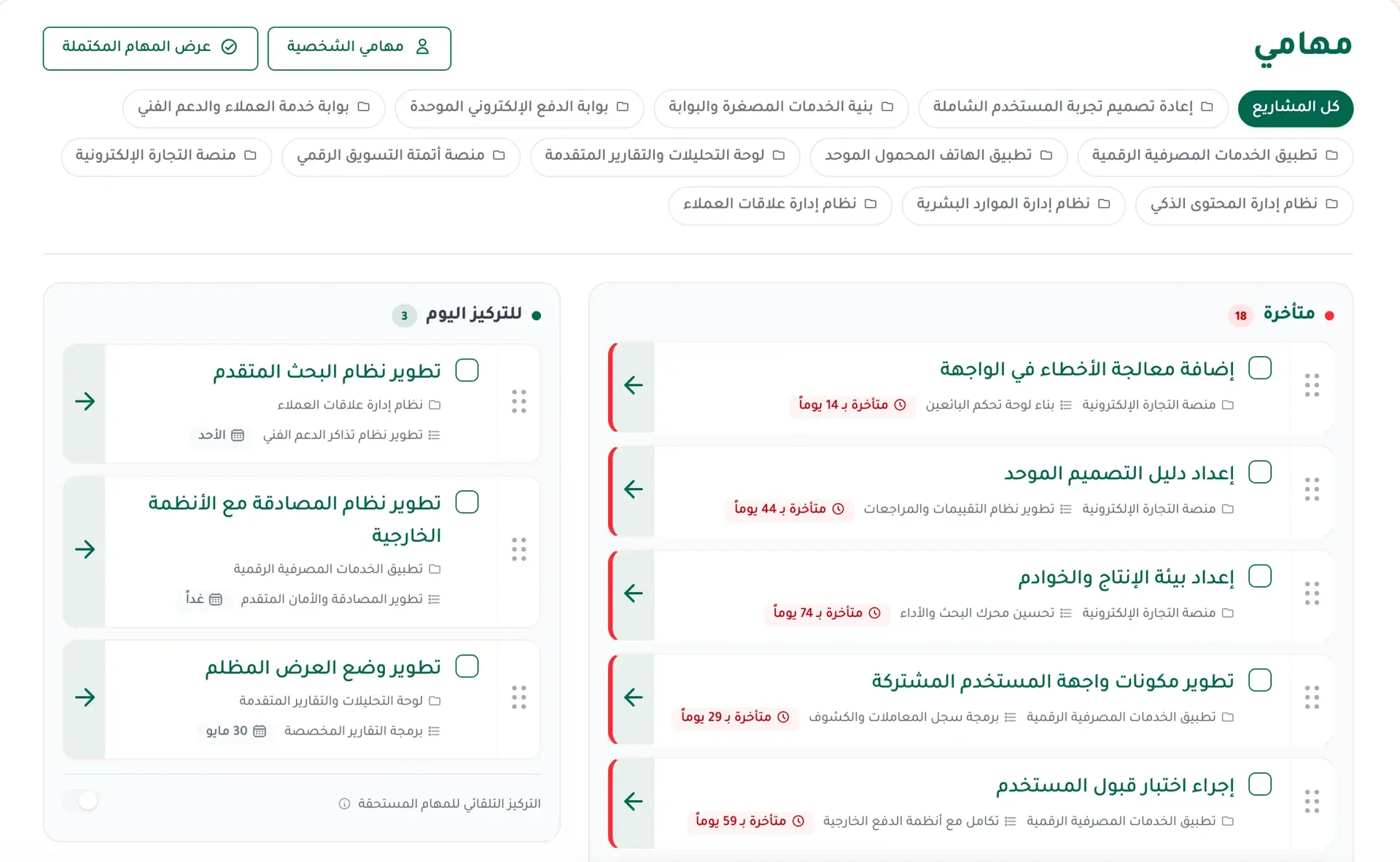
Still Tracking Your Team Across Excel and WhatsApp?
How many times have you opened the spreadsheet, found the latest update missing, then returned to the WhatsApp group to ask everyone where things stand? Messages keep coming, work follows people home, and it is still unclear who did what, who is late, and what is complete.
In Fareeqy, you create a project, divide work into task lists, and give every task one owner, one deadline, and a clear position that shows what comes first. Project members share the same work view, while each person finds their assignments in My Tasks.
The result? Managers see what got done without chasing updates, and every team member knows what they own and what comes next.
Fair Work Starts With a Clear Picture
When ownership, workload, and delivery are visible, follow-up becomes clearer and fairer.
Work Distribution Feels Unfair
When a spreadsheet does not reflect current workload, one person can receive task after task while another is given too little, then both are judged by the same incomplete picture.
Give every task one owner, one deadline, and a visible place in its list. From Pro, open and overdue work appears in reports, helping you review workload before the distribution becomes unfair.
The Work Is Done but Someone Else Gets the Credit
A manager may see the final result without a clear record of who carried the task and completed it. Proving a contribution then depends on memory.
The task owner is visible to project members, and the activity log records who assigned, changed, completed, or reopened the task and when. Delivery stays connected to the person who did it.
Work Keeps Piling Onto One Person
When open and overdue work per person is hidden, more tasks keep going to the same employee until the workload doubles and delivery slips.
Clear ownership, deadlines, and list order show what must happen first. From Pro, member reports expose open and overdue workload so you can rebalance it earlier.
The Work Group Becomes an Endless Shift
Every message feels urgent, and a delayed reply can be treated as poor performance. Follow-up becomes constant pressure, and the office follows employees home.
Tasks and their updates live in one visible place, while assignment and completion notifications replace the need to chase everyone in the group. Each member independently controls which notification types they receive.
How Employee Task Tracking Works in Fareeqy
From assignment to completion, ownership, deadlines, and progress stay in one clear view.
One Owner, One Deadline, One Clear Priority
When a task has no clear owner, everyone waits for someone else to start. In Fareeqy, each task sits inside a task list within a project, with one owner and one deadline; priority is its position in the list, so move it up when it should come first. Every project member can see the project task.
Explore Task ManagementA My Tasks Page for Every Member
Switching between projects to find today's work wastes the start of the day. My Tasks collects every assignment from all of a member's projects, along with private personal tasks only they can see, and lets them reorder work by drag and drop. Overdue tasks and a Focus list for today make the next step clear.
Discover My TasksNotifications for Assignment and Completion
Employees should not discover new assignments by accident, and managers should not need to ask whether work is done. Assignment triggers an instant in-app notification and a phone alert when enabled; completion notifies followers, with the creator and assignee following automatically. Comments and mentions also notify, and every member controls each notification type independently.
Explore Instant NotificationsA Log of Who Changed What
When a deadline moves or a task reopens, you should not have to reconstruct the story from a meeting. The task activity log records who created it, who assigned it to whom, deadline changes with old and new values, description edits, completion or reopening, and when each event happened. It is available on every plan to any member who can open the task.
See the Task Activity LogReports From Individual to Company
Every member on every plan, including Free, gets a personal report showing assigned and completed tasks and completion rate over a period. From Pro, authorized viewers get project, team, department, company, and per-member reports with in-progress, completed, and overdue work plus completion and on-time rates. Filter by today, week, month, quarter, year, or a custom period, then download any report as PDF, Excel, CSV, or JSON.
Explore Tracking ReportsRoles and Visibility Shaped Around the Work
Too much access creates risk, while too little stops work. Built-in roles are owner, manager, and team member; members create and work on tasks in projects they joined, owners and managers can see all projects, and projects can remain private to their members. From Advanced, the owner or someone granted role management can create precise custom roles, such as an accountant who sees reports without editing tasks.
Explore Team Management
Track Delivery, Not Employees
Fareeqy follows agreed work, not people throughout their day. Inside a shared project, employees see the same task, owner, deadline, and completion picture their manager uses, so follow-up is based on clarity and trust.
What Fareeqy Shows
- Who owns each task
- Its deadline and position in the list
- What was completed and when
- What is overdue and needs attention
What Fareeqy Does Not Do
- No attendance or time clock tracking
- No screen capture
- No keystroke logging
- Personal tasks stay private to their creator
The result? Fair delivery follow-up without turning trust into surveillance.
Fareeqy Assistant Organizes the Picture Before Follow-Up Begins
Fareeqy Assistant is available from Pro, and using it is optional. When a member chooses to use it, it reads projects, task lists, tasks, Majlis, files, and the calendar within that member's permissions to prioritize, plan, analyze delays, and summarize.
When you ask it to create or change a task, it does so once you approve, by default, and you can switch on Instant execution if you prefer.
Explore Fareeqy Assistant- “Organize my tasks and tell me what I should finish today”It reads the member's tasks and deadlines and returns an ordered plan for today
- “Analyze the campaign launch project: what is late, and who owns each task?”It returns the late tasks with each owner and deadline, and suggests what to follow up first
- “Summarize this week's Majlis discussions”It returns a short summary of the week's Majlis topics
Move From the Excel Sheet and WhatsApp Group to Clear Work
If your current spreadsheet already holds the work, you do not have to start over. Pro can import an Excel or CSV sheet into projects and tasks, recognizing task, description, status, assignee, and due date columns with Arabic or English headers. You can also begin with free ready-made templates and move follow-up into a workspace the team can see.
Start Free With Clear Limits From Day One
The Free plan is free forever, requires no credit card, and places no cap on team size. It gives you what you need to start tracking team work in one project.
- Unlimited users
- One project with task lists and tasks
- My Tasks and a Focus list for today
- A personal report for every member with assigned tasks, completed tasks, and completion rate
- Assignment and update notifications
- Majlis, calendar, and files
- 1GB of storage, 3 task templates, and one integration
Limits and Upgrades
Free is limited to one project, 1GB of storage, 3 task templates, and one integration. Unlimited projects, 100GB of storage, project, team, department, company, and manager-facing member reports, Fareeqy Assistant, and spreadsheet import start on Pro at $6 per member per month, while custom roles and scheduled email reports start on Advanced at $12 per member per month, billed from 3 seats.
Each company gets one free 14-day trial on the paid plan it chooses, with no credit card.
Task Tracking for the Way Your Team Works
Frequently Asked Questions
What Teams Say About Project Management with Fareeqy
One of the nicest, most pleasant experiences I've had managing teams. Fareeqy stands out for being simple, easy, and uncomplicated.
And the most important feature is scheduling your work and tasks around prayer times, not the other way around!Honestly, I love using Fareeqy,
First, the project organization part, and its reminders if there are overdue tasks.
Fareeqy is easy and straightforward. I don't need to read or watch any video to know how to use any feature; everything is straightforward, and that's what makes me like Fareeqy most.Start With a Clear View of Your Team's Work
Give every task an owner and deadline, then let visible delivery replace status chasing in the group chat.
Free forever • No credit card • Unlimited users