Public Sharing: your client sees the progress, not your workspace
Share a whole project, a task list, a file, a folder, or a Majlis topic on a public link your client opens with no account, and you choose what shows
How often has a client asked for a "quick update", and you spent half an hour taking screenshots, gathering files into a message, and summarising the latest discussions in a long email? Two days later, they ask the same question. Invite them into your workspace instead and they see what is not theirs to see: the team's internal discussions, comments not written for them, and names they do not know.
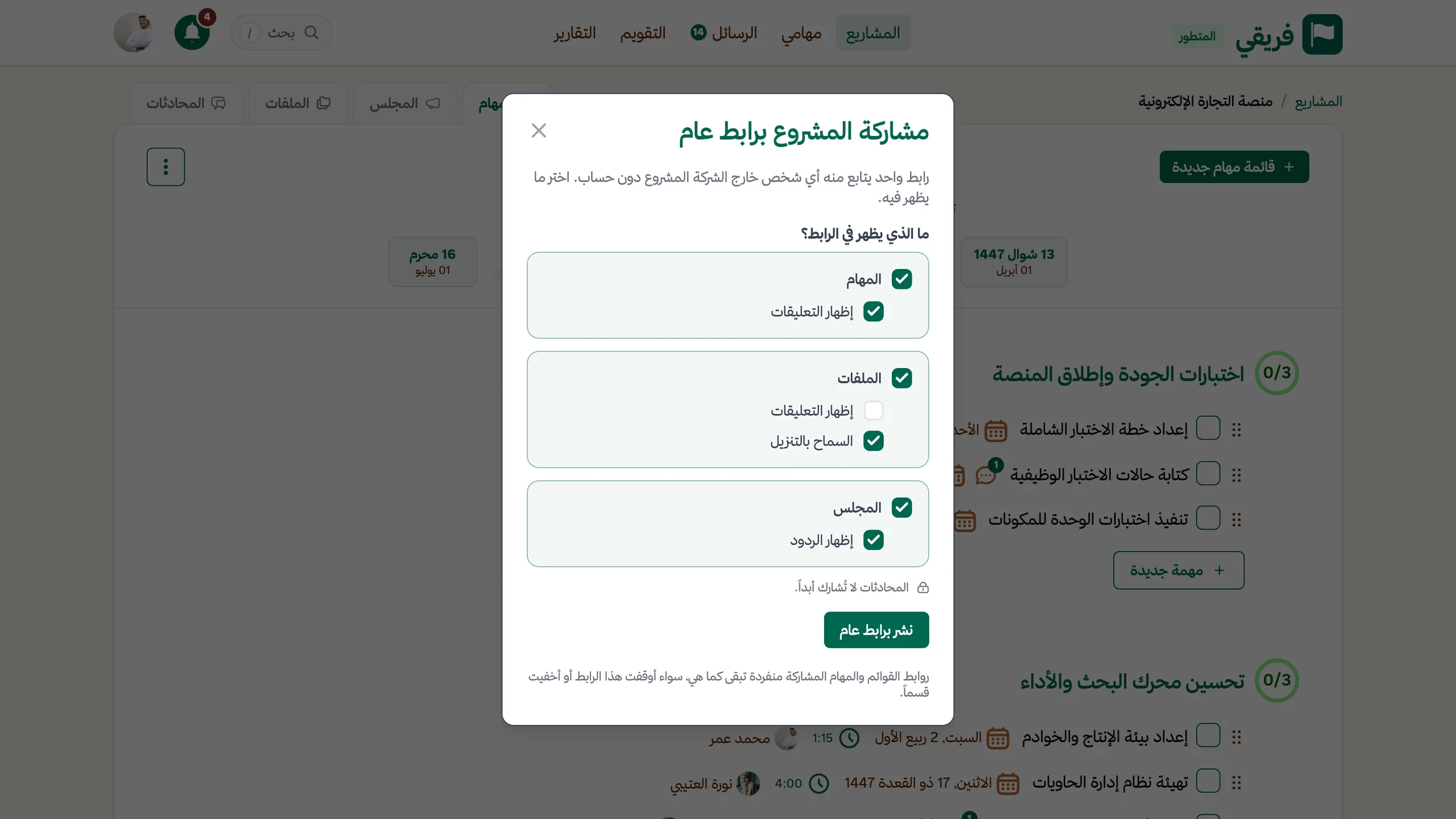
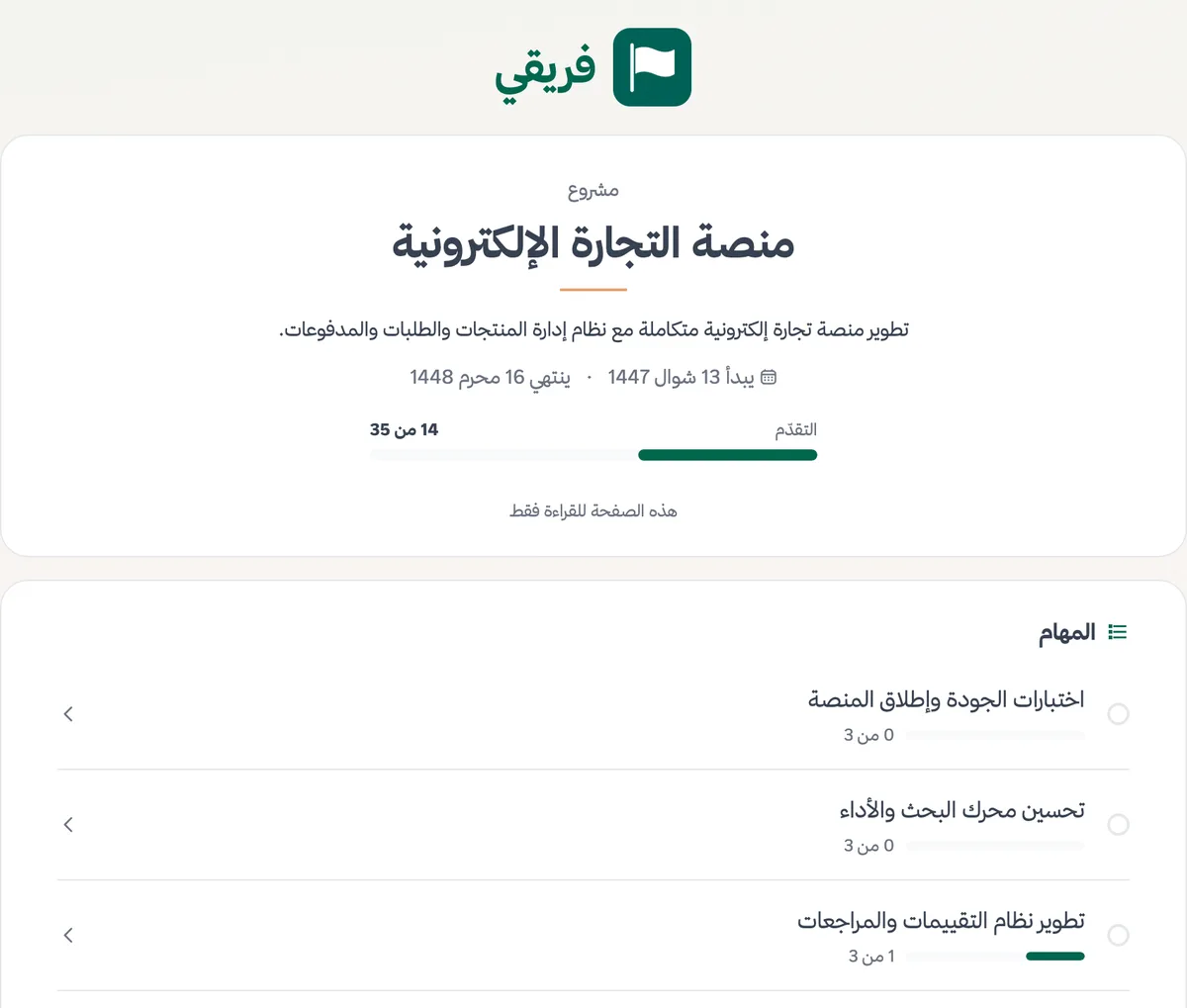
In Fareeqy, you publish what you want them to see behind a public link they open from outside Fareeqy, with no account and no invitation. The page is read-only, so the visitor changes nothing and takes no seat in your subscription. You size the link to what the other side needs:
- A whole project: one link that brings together tasks, files, and the Majlis, with the sections you choose
- A task list or a task: what is done, what remains, who is working on each task, and when it is due
- A file: opened in the browser, and you decide whether it can be downloaded
- A folder: browsed with its subfolders, and the download choice covers the whole tree
- A Majlis topic: the topic as it was written, with its replies
The project link is the widest, so you control each of its sections separately. Show the tasks and decide whether their comments appear. Show the files and decide whether their comments appear and whether they can be downloaded. Show the Majlis and decide whether its replies appear. On the first share only the tasks are shown, and every other section and the download switch stay off until you turn them on. Anything added later to a visible section appears on the link automatically, so you send nothing new as the work moves. Conversations are never shared, on the project link or anywhere else.
Because the link takes the team's work outside, it never stays a secret inside the team. Every project member sees a "Public link" badge in the project header with the sections it shows, and whoever manages sharing sees how many times the link was opened. Publishing each kind is its own permission: share tasks, share files, and share Majlis discussions. Owners and managers hold them by default, and you can grant them to, or remove them from, a custom role.
Control stays with you. Stop any link whenever you want and it stops at once; publish again and the same link works again, so there is no new link to send. Task lists and tasks published on their own links stay as they are, whether you stop the project link or hide one of its sections. Public pages do not appear in search engine results, and a Majlis draft can never be published.
The result? Your client, partner, or funder follows the progress on their own, at any time, from one link. No manual status reports, no screenshots, and no open door into your team's workspace for people who do not belong there.
What your client sees, and what stays yours
A whole project on one link
Instead of a link per list and per file, one link brings together tasks, files, and the Majlis, and shows whatever is added later
You choose what shows
Section by section, with comments, replies, and downloads off until you turn them on
Share just the part that matters
A task list, a task, a file, a folder with its whole tree, or a Majlis topic
Conversations never leave
Conversations appear on no link, and public pages stay out of search engines
Your team knows what is public
A badge in the project header shows every member the visible sections, and whoever manages sharing sees how often the link was opened
Stop it and bring it back
The link stops at once, and publishing again restores the same link, so there is nothing new to send
Key Benefits
Related Features
Project Management
Every project is a complete workspace for your team: tasks, files, conversations, decisions, and an automatic timeline of every action grouped by day. Color-coded departments group the company's projects by type of work.
Task Management
Turn projects into clear tasks. Prioritize, assign, and track completion in real time.. with an automatic activity log on every task showing who created, edited, and completed it.
File Sharing
Upload files and documents in a secure virus-protected space, and share them with your team in one click.
Majlis
A discussion and documentation board inside every project. Document your team's decisions, post announcements and ideas, and build a permanent reference for your project away from message clutter.
Custom Roles & Permissions
Built-in roles do not always match how your team works. Create a role in your team's language, scope exactly what it can see and do, then assign it wherever it is needed.
Related Articles
Frequently Asked Questions
Does my client need a Fareeqy account to open the link?
What can I share through a public link?
Does the client see conversations or the team's comments?
Can the client download files?
What happens when I stop the link?
Who can publish a public link?
Start your first project in 60 seconds
Try Fareeqy for free and start organizing your work with your team
Start Your Free Trial✓ Free Forever • ✓ No Credit Card Required