Keep Law Firm Matters and Deadlines in View
Turn every case or engagement into a private project with clear owners and deadlines. Give your firm practical legal matter tracking and stronger legal team organization.
✓ Free Forever • ✓ No Credit Card • ✓ Ready in 2 minutes
How often has a procedural deadline crept closer while the draft sat in one lawyer’s inbox, the exhibits with another, and the client’s latest decision buried in a conversation? In legal work, a missed deadline is not a routine delay.. it can cost a right or weaken the matter.
Fareeqy is not legal practice management software. It does not maintain a court-connected case database, handle time and billing or trust accounting, or automate legal documents. It manages the work through projects, task lists, tasks, Majlis, and Fareeqy Assistant, with a private project and controlled access for each matter.
The result? Every lawyer knows what is due and who owns it, documents and decisions stay in context, and the office manager can spot risk before it becomes a missed deadline.
How Legal Work Maps to Fareeqy
Fareeqy follows the natural path of legal work from opening a matter to closing it, without forcing an unfamiliar methodology on the firm.
A project represents one case, legal matter, ongoing client retainer, transaction, or internal firm initiative, with access limited to its assigned team.
- Al Noor commercial claim
- Monthly counsel retainer for a retail group
- Technology company acquisition
- Firm conflict-of-interest policy update
A task list can represent a matter stage such as preparation, advocacy, or enforcement; a single filing or hearing with its preparation steps; or one client’s work under a retainer.
- Preparation and evidence gathering
- Appeal brief filing
- Expert hearing preparation
- September retainer work for one client
A task is one specific legal action with exactly one assignee, one deadline, and one priority, supported by notes, attachments, and a record of key changes.
- Review the statement of claim before filing
- File the objection brief by September 12
- Request a certified copy of the judgment
- Send the revised contract draft to the client
Majlis preserves legal reasoning, strategy decisions, and client meeting records in a documented discussion space instead of scattering matter context across messages and memory.
- Legal opinion and supporting authority
- Matter strategy decisions
- Client meeting minutes
- Lessons from previous cases
Ready task lists turn repeatable legal procedures into centrally managed templates, built from scratch or saved from a proven list in one click.
- New matter opening
- Pre-filing checklist
- Hearing preparation
- Matter closing
The project’s Files tab keeps the working documents for that matter together in folders, alongside external Google Drive and Dropbox links.
- Engagement letter and power of attorney
- Briefs, pleadings, and judgments
- Contracts and exchanged drafts
- Links to external evidence and document folders
A Matter’s Working Week in Fareeqy
Open the Matter
Create a project for the case or engagement and make it private to the lawyers working on it. Add the engagement letter, opening documents, and external storage links to the Files tab.
Structure the Work
Divide the matter into preparation, advocacy, and enforcement lists, or make each filing or hearing its own checklist. Apply a ready list for matter opening or hearing preparation so repeatable work begins complete.
Set Ownership and Timing
Give every task one assignee, one deadline, and a priority that reflects the consequence of missing it. Put instructions and attachments in the notes so the lawyer starts with the right context.
Review and Record
Track filings and hearings through tasks and the calendar, then use Majlis to document legal reasoning and strategy. When a deadline or instruction changes, the activity log preserves what changed and who changed it.
Close and Learn
Apply a matter-closing list to confirm final delivery and complete every remaining action. Archive the finished project with the option to restore it, and preserve lessons in Majlis for similar future work.
A Legal Record That Outlives the Meeting
A legal team needs to preserve why a decision was made, not just the decision itself, so its reasoning can be reviewed later. Majlis starts with Announcement, Question, Idea, Update, and General Discussion, then your team adds categories tailored to its legal work.
Legal Opinion and Basis
Record the opinion, assumptions, statutes, and authorities behind it so the team can reassess the advice when facts change.
Matter Strategy Decisions
Capture the chosen course, rejected alternatives, and decision participants so the same strategic debate does not restart from scratch.
Client Meeting Minutes
Preserve client instructions, new facts, and agreed commitments in a record the team can consult when recollections differ.
Procedural Deadline Notes
Document the source, calculation, and changes behind a procedural deadline while keeping the actionable due date on the task.
Lessons from Previous Matters
Capture what worked, what failed, and what should change so similar matters benefit from the firm’s accumulated experience.
An Assistant That Sees Matter Risk Early
Fareeqy Assistant freely reads projects, tasks, task lists, Majlis, files, and the calendar within that member’s existing permissions to summarize matters, analyze delays, and prioritize work. By default, writes happen only once you approve, and the live confirmation card lets you correct a title or priority before execution.
«Which procedural deadlines fall within the next 14 days, and which are at risk?»
It returns a prioritized view of the matter, assignee, due date, priority, and risk signals drawn from current work.
«Summarize what changed in the Al Noor matter since the last client meeting.»
It brings together relevant task updates, Majlis topics, and available files in one permission-aware summary.
«Create the expert hearing preparation tasks and assign them to the matter team.»
It presents the proposed tasks in an editable confirmation card, then creates them once you approve.
«Draft a client update on matter progress and upcoming deadlines.»
It prepares the draft and creates a private PDF or Markdown file in the conversation; publishing it to project files requires your separate button press.
Share with clients only what you choose
Your client does not need a Fareeqy account to review a document or check the current stage of a matter. Show the selected item on an external read-only page without opening the firm's files or internal workspace.
Selected legal document
Your client previews the exact document you selected without seeing the rest of the matter files.
Matter stages
Your client sees stage progress, each task owner, its due date, what is complete and what remains.
Hearing date
Your client opens the event to see its time, place and description without extra coordination messages.
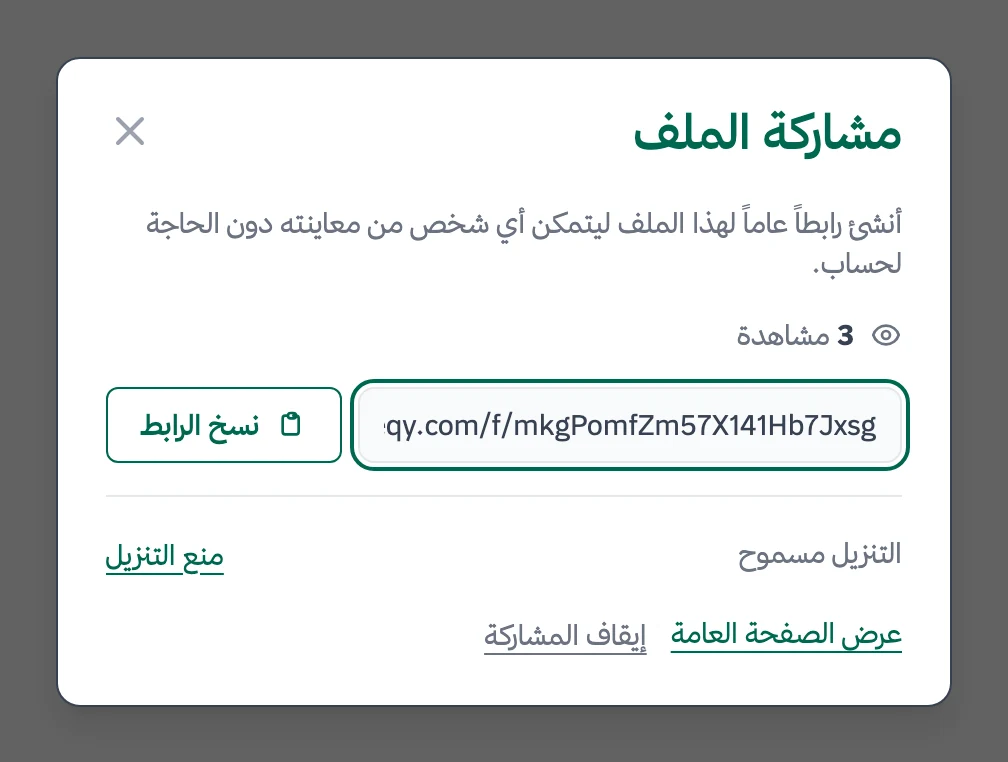
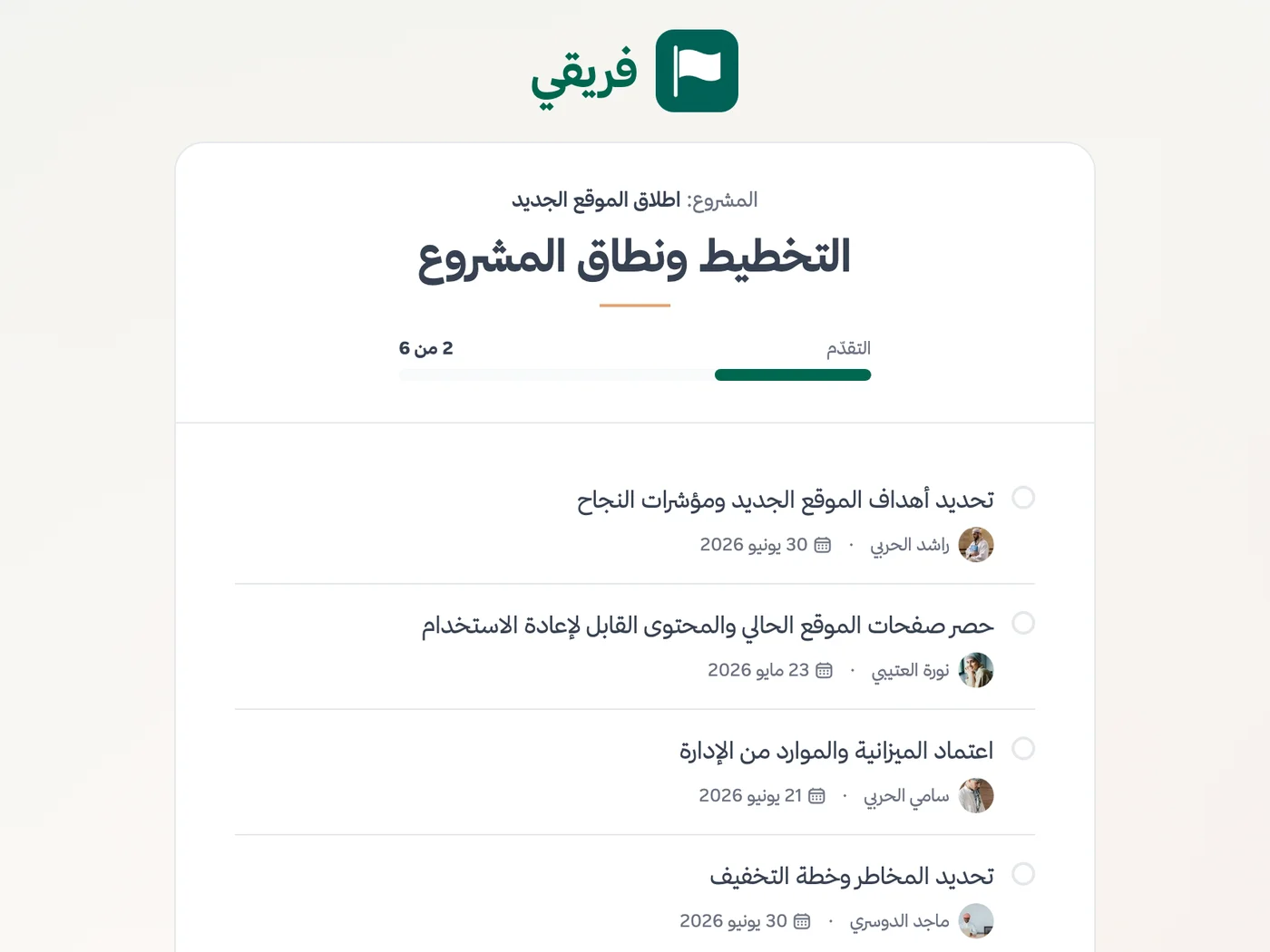
Turn off ‘Allow file download’ for a sensitive document, keep matter-stage comments hidden, and stop sharing whenever you want.
What changes for law firms
Other industries
Frequently Asked Questions
Does Fareeqy replace legal practice management or billing software?
How can I keep each matter visible only to its own team?
How do I track filing and hearing deadlines, and is Hijri supported?
Can we store matter documents inside the project?
Does Fareeqy record who changed a deadline or edited a task?
Can a law firm try Fareeqy for free?
How can I send a sensitive document to my client without allowing a download?
What Teams Say About Project Management with Fareeqy
One of the nicest, most pleasant experiences I've had managing teams. Fareeqy stands out for being simple, easy, and uncomplicated.
And the most important feature is scheduling your work and tasks around prayer times, not the other way around!Honestly, I love using Fareeqy,
First, the project organization part, and its reminders if there are overdue tasks.
Fareeqy is easy and straightforward. I don't need to read or watch any video to know how to use any feature; everything is straightforward, and that's what makes me like Fareeqy most.Start with your first project today
The Free plan lasts forever, and no credit card is required.
Get Fareeqy Free